Amit
March 23, 2026
The Best Firebase Alternative
The Best Firebase Alternative for Developers Who Want Control


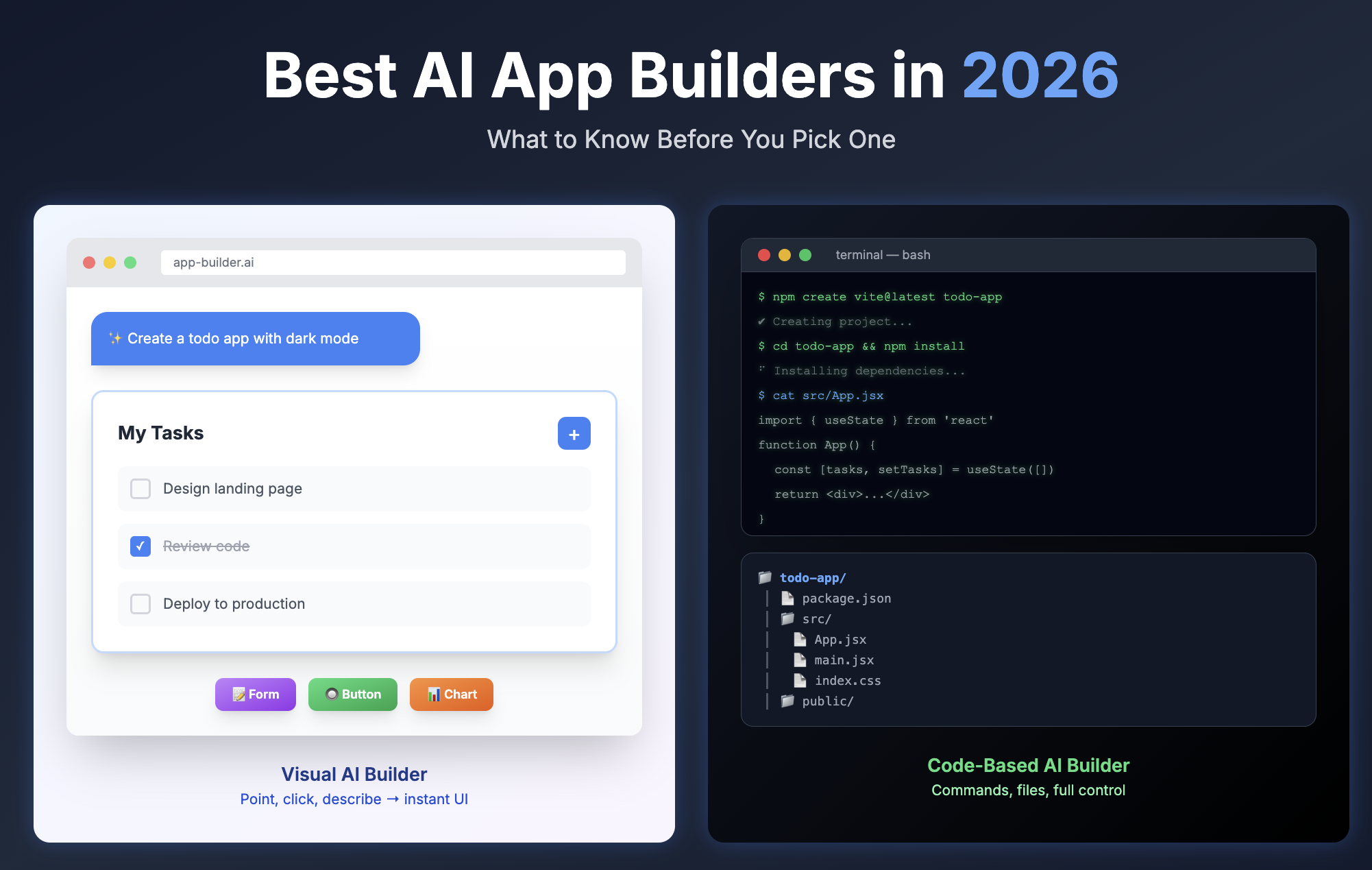
AI app builders have exploded in 2026 - but they're not all solving the same problem. Some are polished no-code platforms for quick MVPs. Others are full-stack agent environments that write, deploy, and test real code. This guide breaks down 8 of the most popular AI app builders, covering what each one actually does well, where it falls short, and who it's built for - so you can pick the right tool before you're three days into the wrong one.
Author:
Published:
Updated:
A year ago, Andrej Karpathy posted a tweet that changed how people talk about software. He described "vibe coding" - giving in to the vibes, letting AI write the code, and forgetting the code even exists. Twelve months later, the AI app builder market has exploded into a crowded, confusing landscape of tools that all promise to turn your idea into a working application.
AI app builders have exploded in 2026 - but they're not all solving the same problem. Some are polished no-code platforms for quick MVPs. Others are full-stack agent environments that write, deploy, and test real code. This guide breaks down 8 of the most popular AI app builders, covering what each one actually does well, where it falls short, and who it's built for - so you can pick the right tool before you're three days into the wrong one.
A note on where this article lives: NonBioS is one of the 8 tools reviewed below, and you're reading this on the NonBioS blog. You'll find it at number six, not number one. If you've read other AI app builder roundups, you've probably noticed most are written by competitors who rank themselves first and end with a "why we're the best" section. We'd rather be honest about what each tool does well - including where others are a better fit than us.
How We Evaluated These Tools
Every tool on this list was evaluated against the same set of criteria. Some of these criteria are standard - pricing, features, deployment options - and some reflect what we've learned matters most when you're actually trying to ship something with AI.
Here's what we looked at: full-stack capability (can it handle frontend, backend, and database, or just one piece of the puzzle?), transparency of the build process (can you see what the AI is doing, or is it a black box?), what happens when the AI gets stuck (this is the question nobody talks about, but it's the one that matters most), deployment and hosting options, code ownership and export (can you take your code and leave?), pricing and value, and community and support.
No single tool wins on every criterion. The right choice depends on what you're building, how technical you are, and how much control you need.
Quick Comparison Table
The polished prototyping machine.
Lovable has become the default starting point for people who want to go from idea to working app with minimal friction. It generates React and TypeScript apps with Tailwind CSS, backed by Supabase for database, authentication, and storage. The experience is closer to working with a designer than a developer - you describe what you want, and it builds something that looks good from the first prompt.
What makes Lovable stand out is how much it gets right on the first try. The UI quality is consistently strong, the Supabase integration handles common backend needs (user accounts, data storage, file uploads) without requiring manual configuration, and the GitHub sync means your code is always accessible in a real repository with automatic commits.
Lovable operates on a credit-based system. The free tier gives you 5 credits per day. Paid plans start at $25/month for 100 credits and scale up to $2,250/month for 10,000 credits. How fast you burn credits depends on complexity — a simple UI change might cost half a credit, while adding authentication costs around 1.2 credits. The Business tier ($50/month base) adds SSO and design templates.
Best for: Non-technical founders, product managers, and agencies building prototypes or MVPs. If you want something that looks production-ready quickly and you're working with a standard web app pattern (dashboard, landing page, CRUD app), Lovable is hard to beat.
Not ideal for: Complex backend logic, multi-tenant SaaS, or anything that requires infrastructure beyond what Supabase provides. The most common complaint is credit burn during debugging loops - when the AI makes a mistake and you spend several credits going back and forth fixing it.
Honest take: Lovable will reliably get you 60-70% of the way to a finished product. For many use cases - especially prototypes, pitch demos, and internal tools - that's enough. For production apps that need custom server-side logic, rate limiting, or security hardening, you'll hit a ceiling.
The framework-flexible builder with token anxiety.
Bolt.new, built by StackBlitz, takes a different technical approach than Lovable. It runs a full Node.js environment entirely in your browser using WebContainers - no local setup, no remote server, just a complete development environment in a tab. This means you get a real browser-based IDE where you can see and edit the code alongside the AI's work.
The framework flexibility is Bolt's main advantage over Lovable. While Lovable outputs React with Tailwind, Bolt supports React, Next.js, Vue, Svelte, Astro, Remix, and Angular. It recently added React Native with Expo for mobile apps. If you have a strong framework preference or need to match an existing project's stack, Bolt accommodates that.
Bolt uses token-based pricing. The free tier provides around 150,000 tokens daily. Paid plans start at $20/month for 10 million tokens and scale to $200/month for 120 million tokens. Tokens roll over for one additional month on paid plans.
Best for: Solo developers and indie hackers who want more control over their tech stack than Lovable provides, and who are comfortable working alongside code in a browser IDE.
Not ideal for: Projects requiring non-JavaScript backends - Bolt only supports Node.js/Express on the server side, so Python, PHP, and Go are out. Also not ideal if you're sensitive to cost unpredictability.
Honest take: Bolt's biggest problem is token consumption during debugging. Users consistently report burning 7-12 million tokens to fix errors that shouldn't be that expensive. The "fix-break" cycle - where fixing one thing breaks another - is more pronounced in Bolt than in other tools we tested. The tool is powerful, but you need to watch your token usage carefully and use features like Diffs mode and Discussion mode to avoid wasteful iterations.
The all-in-one platform that wants to be your only tool.
Replit takes the most ambitious approach on this list: it tries to be your IDE, your AI assistant, your hosting provider, your database, and your deployment platform all in one. The Replit Agent can autonomously write code, create files, install packages, set up databases, and deploy your app - all without leaving the browser.
The language support is the broadest of any builder here: over 50 programming languages including Python, JavaScript, Java, Go, Ruby, and C++. Replit recently launched a mobile app builder (January 2026) and its Agent 3 upgrade added extended thinking, web search during development, and automated testing.
Pricing recently shifted to an effort-based model (January 2026). The free Starter tier includes limited development time. The Core plan at $25/month includes $25 of usage credits. A new Pro plan launching February 20, 2026 costs $100/month flat for up to 15 builders with pooled credits. Additional costs apply for PostgreSQL storage ($1.50/GB/month) and data transfer.
Best for: Solo developers and small teams who want one platform for everything - writing code, hosting apps, managing databases, and deploying. Especially strong for Python-heavy projects and educational contexts.
Not ideal for: Users who want fine-grained control over their environment or who are cost-sensitive. The Agent tends to auto-execute without confirming intent, which means credits can burn quickly when it misunderstands your request. Code export is limited to paid plans.
Honest take: Replit's all-in-one approach is genuinely convenient when it works. The problem is that the Agent can be overconfident - it produces incorrect code without acknowledging uncertainty, and the effort-based pricing means complex tasks can get expensive quickly. If you're building something standard and straightforward, Replit is excellent. If your project has unusual requirements, the Agent's assumptions may fight you.
The frontend king expanding its territory.
v0 started as the best AI tool for generating React UI components, and it's still the best at that. It outputs production-grade React and Next.js code with Tailwind CSS and shadcn/ui components. The design quality is consistently high - often better than what you'd get from Lovable or Bolt - because v0 is deeply integrated with Vercel's component ecosystem.
In August 2025, v0 migrated from v0.dev to v0.app and repositioned itself as a full-stack "AI builder for everyone." It now handles API routes, server-side logic, and Supabase database integration alongside its frontend strength. The deployment story is unmatched: because v0 is built by Vercel, you can go from prompt to live URL with one click and get preview deployments, edge functions, and global CDN automatically.
Pricing is token-based with a credit system. Free users get $5/month in credits (7 messages/day, all generations public). Premium is $20/month. Team is $30/user/month. Business is $100/user/month with training opt-out. Multiple model tiers (Mini, Pro, Max) are available at different token rates.
Best for: Frontend developers, designers, and anyone building within the Next.js/Vercel ecosystem. If your project is UI-heavy and you want the fastest path from design to deployed app, v0 is the best option available.
Not ideal for: Projects outside the React/Next.js ecosystem, or backend-heavy applications. The full-stack capabilities are improving but still secondary to the frontend focus. Free tier forces all generations to be public, which isn't acceptable for commercial projects.
Honest take: v0 is the tool you reach for when you need a beautiful, well-structured frontend quickly. Its full-stack ambitions are real but still maturing. The Vercel deployment integration is a genuine competitive advantage that no other tool on this list can match.
Google's ambitious but unfinished entry.
Firebase Studio (rebranded from Project IDX in April 2025) is Google's answer to the AI app builder wave. It combines a Code OSS-based IDE with Gemini AI and the full Firebase suite -Firestore, Cloud Functions, Authentication, Hosting, and the newer Data Connect (managed PostgreSQL).
The coverage is impressive on paper. It supports JavaScript, TypeScript, Python, Java, .NET, Node.js, Go, and frameworks including Next.js, React, Angular, Vue.js, Flutter, and React Native. It has built-in Android emulators, 60+ templates, and multimodal prototyping that accepts text, mockups, drawings, or screenshots as input. And during the current Preview period, the core product is free.
That "Preview" label is doing a lot of work, though. Firebase Studio has no SLA, no deprecation policy, and limited workspace allocations (3 workspaces without a Google Developer Program membership, 10 with the free tier, 30 with Premium at $24.99/month). Firebase services beyond the free quotas require a Cloud Billing account on Google's Blaze plan. The App Prototyping agent is currently limited to Next.js output.
Best for: Developers already invested in the Google/Firebase ecosystem who want AI assistance without leaving their existing infrastructure. Especially strong for mobile development with Flutter or React Native.
Not ideal for: Anyone who needs production-grade reliability guarantees right now. The Preview status means things can change without notice, and the setup complexity (Google Cloud billing, Developer Program tiers, Firebase configuration) is higher than any other tool on this list.
Honest take: Firebase Studio has the most potential upside of any tool here — if Google follows through. The Gemini integration, the breadth of language and framework support, and the existing Firebase ecosystem add up to something that could be dominant. But right now, it feels early. If you're already in Google's ecosystem and comfortable with Preview-stage software, it's worth experimenting with. If you need something reliable today, look elsewhere.
Best for: Full control and transparency over what the AI is building - with surprisingly strong support for non-technical users.
NonBioS takes an approach that's fundamentally different from every other tool on this list. Instead of running your code in a sandboxed environment or a browser container, NonBioS gives each project a dedicated Ubuntu Linux virtual machine (4GB RAM, 2 vCPU) with full root access. The AI agent operates by executing real Linux commands on your VM - and every single command is visible to you in real time.
This transparency is the core differentiator. When the NonBioS agent writes code, you see the file it creates. When it installs a dependency, you see the apt-get or npm install command. When it configures a database, you see the SQL statements. When it tests the result, you see the curl command and its output. Nothing is abstracted away. The agent also periodically shares its plan, explains its reasoning, and pauses when it needs your input.
The practical consequence is that when the AI gets stuck - and every AI app builder gets stuck eventually - you're never truly blocked. You can see exactly where things went wrong, open the built-in shell or SSH into the VM directly, and fix the issue yourself or redirect the agent. This is the "unblockable development" concept: because the environment is transparent and fully accessible, there's always a path forward.
Because it's a real VM, there are no platform limitations on what you can run. Python with Flask, PHP with MySQL, Next.js, custom AI pipelines with OpenCV, background workers with Celery - if it runs on Linux, it runs on NonBioS. Users have built everything from enterprise telecom tools to SaaS applications to AI-powered image editors.
What's surprising is who actually uses it. NonBioS was designed for developers, but a significant portion of its user base is semi-technical or even non-technical. The reason comes down to two things. First, the transparency that helps developers also helps beginners - when you can see every step the agent took, it's much easier for someone else to diagnose what went wrong. Second, NonBioS has an unusually active Discord community backed by ex-FAANG engineers on the support team. When a non-technical user gets stuck, they can message the Discord and the engineering team will step in and help unblock them directly - often within minutes. The result is that people with no coding background are shipping real applications, not because the AI never fails, but because there's always a human safety net when it does.
Pricing is based on agent minutes - the time the AI is actively working, not your thinking or review time. The free tier includes 60 agent minutes with no credit card required, which is genuinely enough to get an MVP out the door. The Vibecoder plan is $29/month for 180 minutes. Developer is $99/month for 660 minutes. Architect is $199/month for 1,500 minutes. Minutes don't roll over, but you can rebuy your plan's allocation anytime. One thing worth noting: while the base plan looks pricier than Lovable or Bolt's entry tiers, it includes a dedicated VM with a public IP - meaning your app is actually running and accessible on the internet. You're not paying separately for hosting, deployment, or infrastructure. For a SaaS with up to a few thousand registered users (where daily active users are realistically in the hundreds), the included VM handles it without needing to migrate anywhere.
Best for: Developers and technical founders who want to understand and control what the AI is doing. Teams building production applications that need real infrastructure - databases, background processes, custom deployment configurations. Projects that go beyond the standard "React frontend + Supabase backend" pattern. Also, increasingly, non-technical builders who are willing to lean on the Discord community for support when needed.
Not ideal for: Users who specifically want a visual, drag-and-drop experience. The interface is a chat window with a terminal, not a WYSIWYG editor. There's no built-in visual debugger for UI work. If you want to point-and-click your way to an app and never see a command line, Lovable or Glide will feel more natural.
Honest take: NonBioS occupies a category that doesn't quite exist yet in most comparison articles - it's not a no-code builder, and it's not a code editor. It's closer to having an AI developer who works on a real server that you can watch and control. The transparency genuinely solves the "AI gets stuck" problem that frustrates users on every other platform. What caught us off guard is how well the Discord support model works for non-technical users - it effectively turns a developer tool into something accessible to a much wider audience. It's not for everyone, but for developers, technical founders, and people who have hit the ceiling on other builders, it fills a gap nothing else does. And the free tier is generous enough to find out whether it works for you before spending anything.
The AI code editor that professional developers actually use.
Cursor is not an app builder in the same sense as the other tools on this list. It's an AI-native code editor — a fork of VS Code with deep AI integration - and it's become the dominant tool for professional developers who want AI assistance in their existing workflow. It reached over $1 billion in annual recurring revenue by late 2025, making it the fastest-growing SaaS product in history.
What makes Cursor different from an app builder is that it works within your existing codebase, your existing IDE setup, and your existing deployment pipeline. The Agent mode can make multi-file edits from natural language instructions. Tab completion predicts your next edit with a proprietary model. Background Agents (running on remote VMs) can work on tasks in parallel and open pull requests. The new Composer model (Cursor 2.0) is purpose-built for code and claims 4x speed improvements.
Cursor supports multiple AI models including GPT-4o, Claude Sonnet 4.5, Claude Opus 4.5, and Gemini 3 Pro, plus its proprietary models. The free Hobby tier has limited usage. Pro is $20/month. Pro+ is $60/month for 3x usage. Ultra is $200/month for 20x usage and priority access. Teams start at $40/user/month.
Best for: Professional software developers and engineering teams who code daily and want AI to accelerate their existing workflow. If you're already comfortable with VS Code and Git, Cursor is the most productive AI tool available.
Not ideal for: Non-developers, or anyone looking for a complete app-building platform. Cursor doesn't provide hosting, databases, or deployment - you bring your own infrastructure. It's a power tool for people who already know how to build software.
Honest take: Cursor is the best AI coding tool on the market. It's not trying to replace developers; it's trying to make them dramatically faster, and it succeeds. Companies like Salesforce (20,000+ developers), Stripe, and OpenAI have adopted it. But it's a different category from the other tools on this list - if you're reading this article because you want AI to build an app for you, Cursor isn't the answer. If you're a developer who wants AI to build an app with you, it absolutely is.
The fastest path from idea to working app — with caveats.
Base44 has one of the most remarkable origin stories in tech: built as a side project by a solo Israeli developer, it reached 250,000 users and profitability in six months before being acquired by Wix for $80 million in cash in June 2025. Post-acquisition, it's grown to over 2 million users and even ran a Super Bowl teaser ad in January 2026.
The pitch is simple: describe what you want, and Base44 generates a working app with a built-in database, authentication, analytics, and hosting. It's the most opinionated tool on this list - you don't choose your tech stack, framework, or database. Base44 handles everything with its proprietary backend, and in exchange, you get results fast.
The AI selects between Claude Sonnet 4 and Gemini 2.5 Pro automatically (you can override this), and the platform comes with 24+ built-in integrations: Slack, Salesforce, Google Workspace, Stripe, email/SMS, social media, and webhooks.
Pricing uses a dual credit system: message credits (AI interactions, 1-3 per conversation turn) and integration credits (user actions involving integrations, 1 per request). The free tier includes 25 message credits and 100 integration credits per month. Starter is $20/month for 100 message credits. Builder is $40/month with backend functions and GitHub integration. Pro is $80/month. Elite is $160/month for premium support.
Best for: Non-technical users who want a working internal tool, small business app, or prototype as quickly as possible. The all-in-one approach means you don't need to understand or configure any underlying infrastructure.
Not ideal for: Developers who want code ownership and flexibility. Base44's proprietary database creates migration concerns — if you outgrow the platform, moving your data and application logic elsewhere isn't straightforward. Code access is read-only on the free tier and limited even on paid plans. If you need to go beyond what Base44's opinions allow, you'll hit walls quickly.
Honest take: Base44 is the closest thing to "AI builds my app for me" on this list. The speed is real — for simple-to-medium complexity apps, it delivers functional results faster than any other tool. The risk is that speed comes at the cost of flexibility and portability. The Wix acquisition brings stability and resources, but it also means Base44's roadmap is now tied to Wix's priorities. For quick internal tools and MVPs that might not need to scale, it's excellent. For anything you plan to build a business on, think carefully about lock-in.
There's no universal "best" AI app builder — the ideal pick depends on your skill level, your goals, and how much control you want. Use the decision framework below to find your match:
"I want to build something fast with no technical knowledge."
Start with Lovable, Base44, or NonBioS. Lovable gives you strong code ownership and GitHub integration. Base44 is the fastest path for simple apps but comes with more vendor lock-in. NonBioS is a standout here - its free plan is generous enough to not only build a working app from plain English but also host it on a dedicated VM. This means you can go from idea to a live, shareable link in a remarkably short amount of time, making it ideal for quick validation and early feedback.
"I'm a developer who wants AI to speed up my coding workflow."
Cursor is the go-to if you want deep IDE integration, full control over your codebase, and flexibility with your own deployment pipeline — especially when rapid deployment isn't the priority. However, if your goal is to build quickly and get something hosted fast so you can start collecting feedback, NonBioS is an excellent complement. It lets you skip the deploy-config headache and go live almost immediately. v0 is also a solid secondary option if you're specifically building React/Next.js frontends.
"I want full control over what the AI is building and the ability to intervene."
NonBioS or Replit. Both support a broad selection of languages and frameworks, but they differ significantly in philosophy, portability, and critically - long-term cost.
A Note on Cost and Lock-in
This is worth highlighting: Replit can become very expensive, very fast. As your app grows, you become increasingly dependent on Replit's proprietary services - their key-value store, their hosting, their deployment infrastructure. Once your data and workflows are entangled with these platform-specific tools, migrating away becomes painful and costly. You're essentially paying a growing premium for convenience you chose early on.
NonBioS takes the opposite approach. Because there's zero lock-in and no dependency on any third-party proprietary service, you retain full freedom to migrate your app - database, hosting, and all - to cheaper infrastructure options as your needs evolve. You might start on NonBioS VM today and move to a $5/month VPS tomorrow without rewriting a single line of code. That kind of portability translates directly into long-term cost control that simply isn't possible on a locked-in platform.
"I need to build within Google's ecosystem."
Firebase Studio, with the caveat that it's still in Preview. If you need production-grade reliability today, pair Cursor with Firebase services manually for a more stable setup.
"I want to turn a design into code."
v0 for React/Next.js projects, Lovable for general web apps. Both accept Figma imports on their paid plans.
"I'm building a mobile app."
You have several strong options depending on your framework preference:
What is an AI app builder?
An AI app builder is a tool that uses large language models to generate application code from natural language descriptions. You describe what you want - "build me a task management app with user accounts and a dashboard" - and the AI generates the frontend, backend, and database code. These tools range from fully managed platforms (like Base44) where you never see the code, to transparent environments (like Nonbios) where you see every command the AI executes, to AI-enhanced code editors (like Cursor) that work within your existing development workflow.
Can AI really build a full app?
Yes, with caveats. AI app builders can reliably produce working prototypes, MVPs, and simple-to-medium complexity applications. They handle standard patterns well: CRUD interfaces, authentication flows, dashboards, landing pages, and API integrations. Where they struggle is with complex business logic, unusual technical requirements, performance optimization, and security hardening. The realistic expectation is that AI gets you 60-80% of the way there, and the remaining work requires human judgment - either yours or a developer you hire.
What is the best free AI app builder?
Every tool on this list has a free tier, but they vary significantly. Firebase Studio is the most generous during its Preview period (full access, limited workspaces). Lovable gives 5 free credits per day. Bolt.new provides approximately 150,000 free tokens daily. Nonbios offers 60 free agent minutes. Base44 gives 25 message credits per month. For most real projects, you'll need a paid plan - free tiers are best for evaluation and small experiments.
What is vibe coding?
Vibe coding is a term coined by Andrej Karpathy in February 2025 to describe a style of AI-assisted development where you describe what you want in natural language, let the AI generate the code, and accept the results without necessarily reading or understanding every line. The term has become mainstream - Collins English Dictionary named it Word of the Year 2025. In practice, vibe coding works well for prototypes and personal projects, but experienced developers caution against using it for production applications without human code review.
Do I need to know how to code to use an AI app builder?
It depends on the tool. Base44, Lovable, and Bolt.new are designed to be usable without coding knowledge. v0 and Replit are more accessible with some coding background. Nonbios and Cursor are oriented toward people who are comfortable with technical concepts, even if they're not full-time developers. For all tools, having some programming literacy helps you communicate more precisely with the AI and debug issues when they arise - and issues will arise.
What happens when the AI gets stuck building my app?
This is the most important question most comparison articles don't address. Every AI app builder hits limits - the AI misunderstands your intent, produces buggy code, or gets caught in a loop. What matters is how the tool handles failure.
On most platforms (Lovable, Bolt.new, Base44), your main option is to try rephrasing your prompt and hope the AI corrects itself - which burns credits. On Replit, you can drop into the IDE and edit code manually, but the Agent may overwrite your changes on the next turn. On Cursor, you have full control since you're already in a code editor.
NonBioS handles this differently because of its transparent architecture. Every command the agent runs is visible, and you have SSH and shell access to the VM. If the AI installs the wrong package, you can see the command, uninstall it, and redirect the agent. If a file is broken, you can open it directly and fix it. The Discord community can also diagnose issues because the command log makes problems visible. This "unblockable" approach doesn't mean the AI never fails - it means failure never leaves you stranded.
Can I deploy apps built with AI app builders to production?
Yes, but the deployment story varies significantly. v0 has the smoothest path (one-click Vercel deployment). Lovable and Bolt.new offer built-in hosting with custom domains. Replit has integrated hosting with multiple deployment types. Firebase Studio deploys to Google Cloud. Nonbios apps run on the VM directly and can be deployed to any hosting provider via GitHub. Cursor doesn't provide hosting - you deploy however you normally would.
For production use, consider that most AI-generated apps will need additional work on security, error handling, performance optimization, and monitoring. The code is a strong starting point, not a finished product.
What is the difference between AI app builders and traditional no-code tools?
Traditional no-code tools (like Bubble, Glide, or Softr) use visual interfaces - you drag and drop components, connect data sources, and configure logic through forms and menus. AI app builders generate actual code from natural language descriptions. The key differences: AI builders typically produce standard, portable code you can export and run anywhere, while no-code tools create applications that only run on their platform. AI builders handle a wider range of applications but require more precise communication. No-code tools are more predictable but more limited. The lines are blurring - many no-code tools are adding AI features, and some AI builders (like Base44) are moving toward more managed, platform-dependent approaches.
Quick signup, give NonBioS a high-level instruction, see progress within minutes. Your first multi-hour session is on the house.
No Credit Card Required