Amit
March 23, 2026
The Best Firebase Alternative
The Best Firebase Alternative for Developers Who Want Control


As AI Software Development tools mature, we're seeing convergence in some areas and continued divergence in others. Most platforms now offer multi-file editing, codebase awareness, and natural language interaction. Yet their fundamental philosophies remain distinct: abstraction versus transparency, convenience versus control, specialization versus generality.The most successful developers will likely use multiple tools, selecting the right one for each task.
Author:
Published:
Updated:

The landscape of software development has undergone a remarkable transformation in recent years. What once required hours of manual coding, debugging, and iteration can now be accelerated through intelligent AI assistants that understand context, generate code, and even architect entire applications. Yet with this proliferation of AI development tools comes a critical question: which approach actually delivers on the promise of faster, more efficient development?
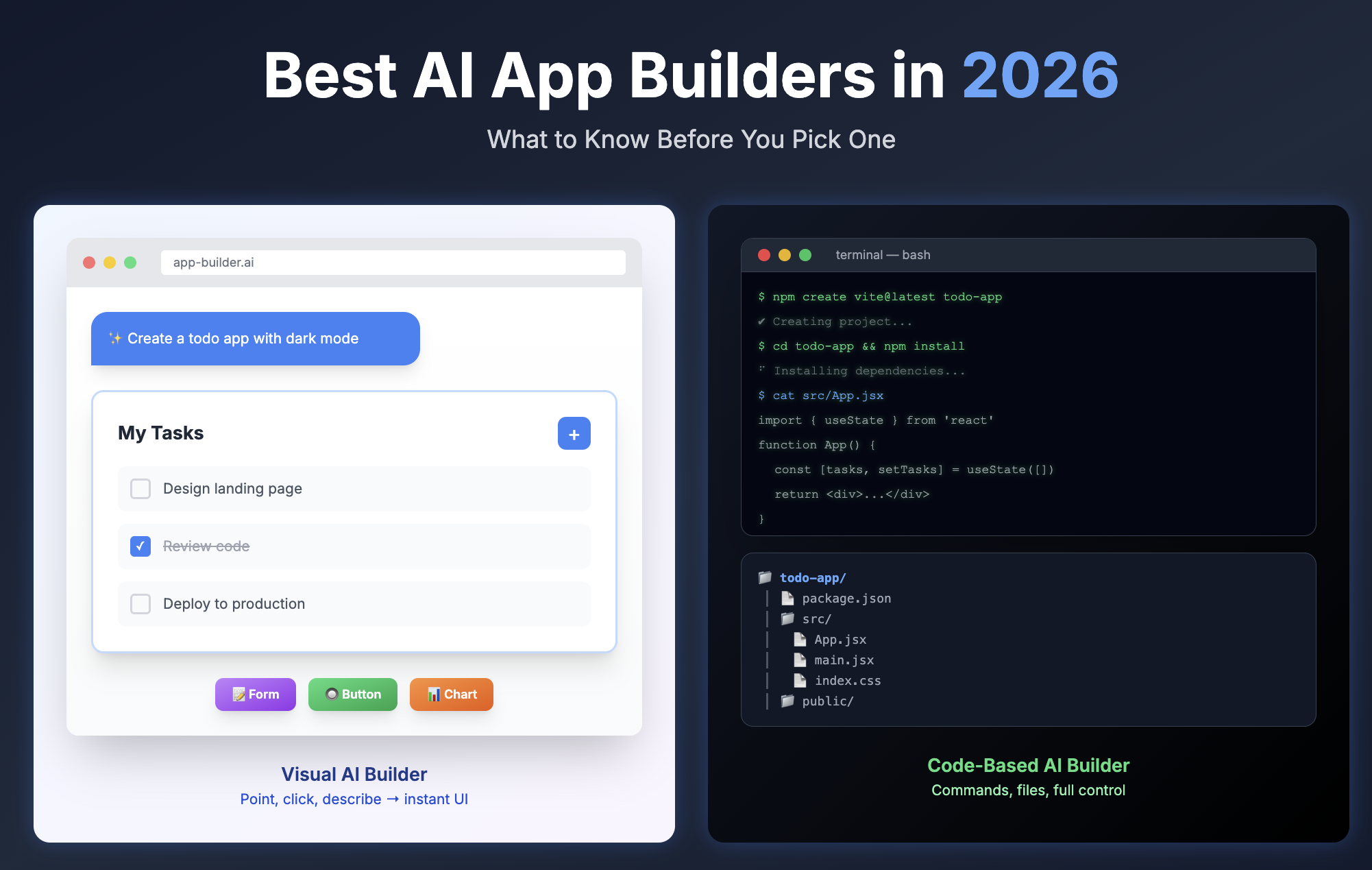
AI-powered development tools exist along a spectrum, each optimizing for different aspects of the development workflow. On one end, you have code completion assistants that enhance your existing IDE experience. On the other, you find full-stack development environments that can build entire applications from natural language descriptions. Between these extremes lies a rich ecosystem of specialized tools, each with distinct philosophies about how AI should augment human creativity.
The choice between these tools isn't merely technical—it reflects fundamental assumptions about what developers need most. Some tools assume developers want to stay in their familiar environments, adding AI as a layer on top of existing workflows. Others reimagine the entire development experience from the ground up, treating AI as a first-class citizen rather than an add-on.
GitHub Copilot pioneered the concept of AI pair programming within the IDE. Built on OpenAI's Codex model, Copilot integrates seamlessly into Visual Studio Code, JetBrains IDEs, and other popular development environments. Its strength lies in contextual code suggestions that feel almost prescient—as you type, Copilot anticipates your next lines of code, often generating entire functions from a simple comment.
The appeal of Copilot is its non-disruptive nature. Developers continue working in their preferred environments, with their customized keybindings and extensions, while Copilot quietly enhances productivity in the background. For teams with established workflows and deep investments in specific IDEs, this minimal friction approach proves invaluable. Copilot's pricing reflects its enterprise focus, with individual plans at $10/month and business plans at $19/user/month, offering features like code referencing and IP indemnity for larger organizations.
However, Copilot's IDE-centric design also reveals its limitations. While excellent at completing code within files, it lacks broader project awareness. It won't refactor your entire codebase, set up deployment pipelines, or manage dependencies across multiple services. Copilot enhances what you're already doing but doesn't fundamentally change how you approach development.
Cursor AI takes the IDE-native approach further, building an entire editor around AI capabilities. Rather than being a plugin, Cursor is a fork of VS Code with AI deeply integrated into every aspect of the development experience. Its "Composer" feature can edit multiple files simultaneously, understanding how changes in one file should propagate to others. The "Chat" interface provides context-aware assistance that understands your entire codebase, not just the current file.
What distinguishes Cursor is its understanding of project structure. Ask it to implement a new feature, and it will identify which files need modification, create new ones as needed, and ensure consistency across your codebase. This project-level awareness makes Cursor particularly effective for refactoring, feature implementation, and architectural changes that span multiple files.
Cursor's pricing model offers flexibility: a free tier with limited AI requests, a $20/month Pro plan with 500 fast premium requests, and usage-based pricing beyond that. For developers who want AI capabilities without abandoning the VS Code ecosystem they know, Cursor represents an evolution rather than a revolution.
Yet even Cursor operates within the traditional development paradigm. You still manage your development environment, install dependencies, configure build tools, and handle deployment separately. The AI accelerates coding but doesn't eliminate the surrounding complexity of modern software development.
A different philosophy emerges with tools like Bolt.new and v0.dev, which reimagine development as a conversation rather than a coding session. These platforms don't enhance your existing workflow—they replace it with something fundamentally different.
Bolt.new, powered by StackBlitz's WebContainer technology, offers a complete development environment in your browser. Describe an application in natural language, and Bolt generates not just code but a fully functional, running application. It installs dependencies, configures the build system, and provides a live preview—all without requiring any local setup.
The magic of Bolt lies in its execution model. Unlike tools that generate code for you to run elsewhere, Bolt creates genuinely functional applications within its sandboxed environment. You can interact with the running application immediately, request changes, and see them reflected in real-time. This tight feedback loop between description, generation, and testing accelerates iteration dramatically.
Bolt's pricing reflects its comprehensive capabilities: a free tier for exploration, a $20/month Starter plan with 5 million AI tokens and 10 concurrent projects, and a $40/month Pro plan with 10 million tokens and 20 projects. The token-based model acknowledges that different projects consume varying amounts of AI resources—a simple landing page requires far less than a complex full-stack application.
However, Bolt's browser-based nature imposes constraints. While perfect for web applications, it struggles with projects requiring native system access, specialized databases, or custom infrastructure. The WebContainer environment, though impressive, remains a sandbox with inherent limitations.
v0.dev from Vercel takes a more focused approach, specializing in UI generation. Rather than attempting full-stack development, v0 excels at creating beautiful, functional React components from descriptions or even screenshots. Its integration with Vercel's deployment platform creates a streamlined path from design to production for frontend projects.
v0's strength is its opinionated nature. It generates code using modern best practices—Tailwind CSS for styling, shadcn/ui for components, and TypeScript for type safety. This opinionation ensures consistency and quality but also means v0 works best when your project aligns with its assumptions.
The pricing model is generous for exploration: 200 free credits monthly (enough for 20-40 generations), with paid plans at $20/month for 5,000 credits. For teams focused on rapid UI prototyping and iteration, v0 offers remarkable value.
Replit has evolved from an educational coding platform into a sophisticated AI-powered development environment. Its Replit Agent can build entire applications from descriptions, but unlike Bolt, it provides a full Linux environment with persistent storage, custom domains, and deployment capabilities.
What makes Replit compelling is its infrastructure-as-code approach. The AI doesn't just generate application code—it configures the entire runtime environment, installs system dependencies, and sets up deployment pipelines. For developers building backend services, APIs, or applications requiring specific system configurations, Replit offers capabilities that browser-based tools cannot match.
Replit's pricing spans from a free tier to a $25/month Replit Core plan with enhanced AI capabilities and compute resources. The platform's strength lies in its balance between simplicity and power—accessible enough for beginners yet capable enough for production applications.
Windsurf IDE by Codeium represents another evolution of the cloud IDE concept. Built on VS Code's foundation, Windsurf combines familiar editing experiences with AI capabilities that understand entire codebases. Its "Cascade" feature enables multi-file editing with awareness of how changes propagate through your project.
Windsurf's free tier is notably generous, offering unlimited AI completions and chat—a stark contrast to competitors' token-limited models. The Pro plan at $15/month adds advanced models and priority support. This aggressive pricing suggests Codeium's strategy of democratizing AI development tools rather than maximizing per-user revenue.
Amid these sophisticated platforms emerges a different approach entirely. NonBioS strips away the complexity of specialized interfaces, custom IDEs, and proprietary environments, returning to a fundamental truth: at its core, development is about executing commands and manipulating files.
NonBioS operates as a conversational interface to a complete Linux development environment. Rather than learning a new platform's abstractions, you work directly with the underlying system. Need to set up a database? The AI executes the actual MySQL or PostgreSQL commands. Want to deploy an application? It configures Apache or Nginx directly. This transparency means you're never locked into proprietary abstractions or limited by platform constraints.
The architecture is deliberately minimal: a pre-configured Ubuntu VM with a full LAMP stack, Python, Git, and standard development tools. The AI assistant understands how to use these tools effectively, but the tools themselves are standard, well-documented, and universally applicable. Knowledge gained using NonBioS transfers directly to any other Linux environment.
This lean approach offers unexpected advantages. Because NonBioS uses standard Linux commands, you can verify every action, understand exactly what's happening, and intervene when needed. The AI doesn't hide complexity behind abstractions—it helps you navigate real complexity with expert guidance. When something goes wrong, you're debugging actual system behavior, not a platform's interpretation of it.
The execution model is straightforward: you describe what you want to accomplish, the AI breaks it down into specific Linux commands, and those commands execute directly on the VM. You see the actual output, can inspect files with standard tools, and maintain complete control. This directness eliminates the "black box" feeling that sometimes accompanies more abstracted platforms.
For developers who value understanding over convenience, who need to work with specific technologies or configurations, or who want skills that transfer beyond a single platform, NonBioS offers a compelling alternative. It's not about replacing your development workflow with something new—it's about augmenting your existing Linux knowledge with AI assistance.
The proliferation of AI development tools reflects genuine diversity in developer needs rather than market confusion. Each approach optimizes for different priorities, and the "best" tool depends entirely on your context.
Choose GitHub Copilot or Cursor if you have established workflows in specific IDEs and want to enhance rather than replace them. These tools minimize disruption while maximizing AI assistance within familiar environments. They're ideal for teams with significant investments in existing toolchains or developers who value their customized development environments.
Choose Bolt.new or v0.dev if you're prototyping web applications and value speed over control. These platforms excel at rapid iteration and getting functional applications running quickly. They're perfect for validating ideas, building MVPs, or creating demos without infrastructure overhead.
Choose Replit or Windsurf if you need cloud-based development with more infrastructure control than browser-based tools provide. These platforms balance accessibility with power, offering full development environments without local setup requirements.
Choose NonBioS if you value transparency, portability, and direct system access. It's ideal for developers comfortable with Linux who want AI assistance without platform lock-in, or for projects requiring specific configurations that proprietary platforms don't support.
As these tools mature, we're seeing convergence in some areas and continued divergence in others. Most platforms now offer multi-file editing, codebase awareness, and natural language interaction. Yet their fundamental philosophies remain distinct: abstraction versus transparency, convenience versus control, specialization versus generality.
The most successful developers will likely use multiple tools, selecting the right one for each task. Copilot for daily coding, Bolt for quick prototypes, NonBioS for infrastructure work, v0 for UI design—each tool has its place in a modern development workflow.
What's clear is that AI hasn't replaced developers; it's amplified their capabilities. The tools that succeed are those that understand this distinction, enhancing human creativity rather than attempting to automate it away. Whether through sophisticated abstractions or transparent command execution, the goal remains the same: helping developers build better software, faster.
The question isn't which tool is "best" in absolute terms, but which tool best aligns with your needs, your skills, and your project requirements. In this diverse ecosystem, that's exactly as it should be.
Quick signup, give NonBioS a high-level instruction, see progress within minutes. Your first multi-hour session is on the house.
No Credit Card Required